AI vs Human:
How to Write a Resume That Survives 2026’s Hiring Tech and Impresses Recruiters
Admin
2/8/20267 min read
If your job search feels broken even though you’re “qualified,” there’s a reason.
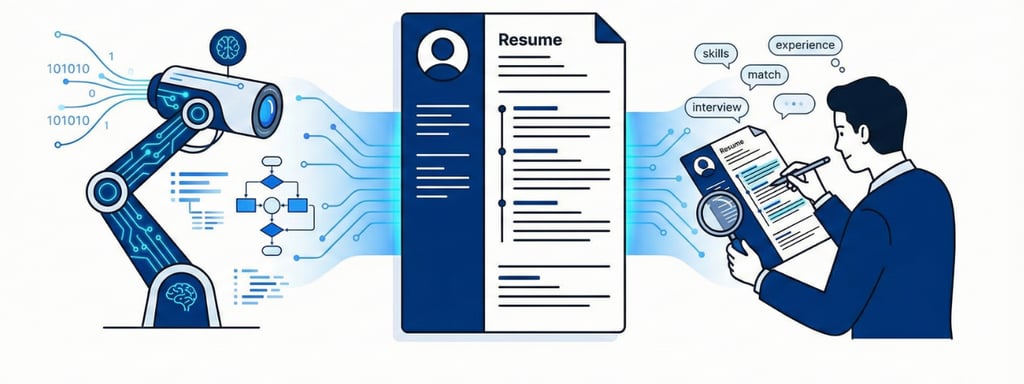
In 2026, your resume is no longer read only by a human. It is first scanned, sorted, and sometimes scored by algorithms: Applicant Tracking Systems (ATS), AI résumé parsers, and even AI-based “fit” models. Only then—if you pass those filters—does a human recruiter spend a few seconds deciding whether you’re worth a closer look.
For job seekers, especially students and early‑career professionals in India and globally, this raises a big question:
How do you write one resume that works for both AI and humans?
This post breaks it down in practical terms, so you can build a resume (with tools like HireLinking) that:
Gets parsed correctly by ATS and AI screeners
Surfaces in recruiter searches
Still looks clean, modern, and convincing to a real person
1. What AI Is Actually Doing in Hiring Now
AI in hiring is no longer “coming,” it’s already here:
Large and mid‑size companies have been using Applicant Tracking Systems (ATS) for years to collect, organize, and filter resumes. A 2020s analysis found that almost all Fortune 500 companies use an ATS to manage applicants.
Newer tools go further: AI can now read, classify, and rank resumes against job descriptions, sometimes even generating a “fit score” for each candidate.
In India, AI‑based campus recruitment tools help companies process thousands of applications within hours, shortlisting candidates for tests and interviews automatically.
In practice, this means:
For many roles—especially at larger companies—your first “interviewer” is software, not a person.
If your resume isn’t machine-readable or doesn’t contain the right signals, a human may never see it, no matter how good you are.
2. How ATS and AI “Read” Your Resume
To write for AI, you need to understand what it looks for.
2.1 Structure and Formatting
ATS and AI parsers are trained to find standard patterns:
Your name and contact details at the top
Clear section headings: “Summary”, “Experience”, “Education”, “Skills”, “Projects”, “Certifications”
Job entries with job title, company, location, and dates
They work best when:
The layout is clean and linear (usually one main column)
Text is actual text—not inside images, shapes, or complex tables
Fonts are standard and easy to parse
They struggle when:
There are a lot of graphics, icons, and multi‑column layouts
Important information is inside text boxes, images, or headers/footers
File formats are unusual or heavily compressed
This is why ATS‑aware templates (like those used by HireLinking) focus on clean design + correct structure, not just aesthetics.
2.2 Keywords and Skills Matching
AI and ATS tools compare your resume to the job description:
They look for keywords related to skills, tools, responsibilities, and sometimes industries or certifications.
They often categorize experience into buckets like “Programming Languages”, “Marketing Skills”, “Management”, etc.
They measure how strongly your resume matches the job based on these keywords and context.
If a job description says:
“Looking for a Business Analyst with SQL, Excel, stakeholder management, and dashboarding experience (Power BI/Tableau).”
An AI‑friendly resume should naturally and truthfully reflect that language:
“Built interactive dashboards in Power BI for sales and operations teams.”
“Used SQL and advanced Excel to analyze transaction data and present insights to stakeholders.”
You are not “gaming the system”; you are making sure your real skills are described in the same language the employer uses.
3. How Human Recruiters Read Your Resume
Even after passing AI filters, you still face human judgment—and it’s fast.
Recruiters and hiring managers typically:
Spend a few seconds on the first scan of your resume
Look at the top third of the first page first: name, title, summary, current role, and skills
Skim for evidence that you can do the job: outcomes, tools, scope of work
Note any red flags: unexplained long gaps, very short stints, messy layout, unclear roles
Humans care deeply about:
Story and coherence – Does your career trajectory make sense?
Impact – Have you actually achieved results, not just done tasks?
Clarity – Can they quickly understand what you do and at what level?
Professionalism – No major typos, inconsistent formatting, or amateurish design.
So your resume must do double duty:
Speak in machine language (structure + keywords)
Speak in human language (clear story + compelling achievements)
4. The AI–Human Hybrid Strategy for Your Resume
Here is a practical framework you can use when building or rewriting your resume for 2026’s hiring reality.
4.1 Start With a Clean, ATS‑Friendly Template
Design is important—but function comes first.
Choose a template that:
Uses standard fonts (e.g., Arial, Calibri, Roboto)
Has clearly labeled sections
Puts most content in a single main column, with any second column used carefully
Avoids heavy use of icons, graphics, or decorative elements where your main content lives
This is exactly what HireLinking’s templates are tuned for: modern to the human eye, but simple under the hood so ATS doesn’t break.
4.2 Write a Clear, Targeted Summary
Your summary is the first thing both AI and humans see.
Bad summary:
“Hardworking individual seeking a challenging position to grow and learn.”
Good AI‑ and human‑friendly summary:
“Data Analyst with 3+ years of experience in SQL, Python, and Power BI, specializing in sales and operations analytics. Improved forecast accuracy by 18% and reduced reporting time by 40% through automated dashboards and ETL workflows.”
Why this works:
It includes role, experience, and core tools/skills (good for AI).
It highlights concrete outcomes (good for humans).
It uses language that can be easily matched to job descriptions in analytics roles.
4.3 Build a Focused Skills Section
Create a dedicated Skills section that is:
Grouped into logical categories (e.g., “Programming”, “Marketing Tools”, “Soft Skills”)
Aligned with your target roles (based on real job descriptions)
Honest—only list skills you can defend in an interview or assessment
Example:
Skills
Digital Marketing: Meta Ads, Google Ads, Performance Marketing, Remarketing, Landing Page Optimization
Analytics & Tools: Google Analytics, Looker Studio, Excel (Pivot Tables, VLOOKUP), A/B Testing
Soft Skills: Stakeholder Communication, Campaign Strategy, Copywriting
This helps:
AI quickly classify you in the right “bucket”
Recruiters scan in seconds and say: “Yes, this is what we’re looking for.”
4.4 Turn Responsibilities Into Achievements
A human recruiter is bored by a list of duties. AI may match keywords, but without context and impact, you won’t stand out.
Transform this:
“Responsible for social media posts and managing Instagram account.”
Into this:
“Planned and executed a content calendar for Instagram, increasing followers from 2,000 to 15,000 and improving average engagement rate from 1.8% to 4.3% in 8 months.”
Formula to follow:
Action verb + what you did + tools used (optional) + measurable outcome
Examples:
“Increased organic traffic by 40% in 6 months by optimizing 20+ SEO landing pages.”
“Reduced customer support response time by 25% by implementing canned responses and a new ticket routing workflow.”
“Closed ₹1.2 Cr in B2B SaaS deals in FY24, focusing on mid‑market clients in manufacturing and logistics.”
These bullets simultaneously:
Contain strong keywords (for AI)
Convince humans that you can deliver real results
4.5 Tailor for Each Application (Without Burning Out)
You don’t need a brand‑new resume for every job—but you do need light tailoring:
For each job:
Read the job description and highlight the top 6–10 keywords (skills, tools, responsibilities).
Make sure relevant ones appear in:
Your summary
Top 2–3 bullets under your current/most relevant role
Your Skills section
Reorder bullet points so the most relevant achievements appear first.
With a structured template (like those from HireLinking), this takes 5–10 minutes per application, not hours.
5. Common Mistakes That Break AI or Turn Off Humans
To truly win in 2026’s AI‑driven hiring, avoid these traps:
5.1 Over‑Designed, Under‑Readable Resumes
Graphic‑heavy resumes might look “creative,” but:
ATS may fail to parse them correctly
Important details can get lost or misread
Recruiters may struggle to skim quickly
If you’re in a design-heavy field, keep two versions:
A clean ATS‑friendly resume (primary)
A portfolio or one‑page visual CV you can send directly via email/portfolio links
5.2 Keyword Stuffing Without Proof
AI is getting smarter. Tools can flag resumes that:
Mindlessly stuff keywords from the job description
Repeat the same skill multiple times with no context
Recruiters also see through this immediately.
Instead of listing “Python” 10 times, write one or two strong bullets proving you used Python to solve real problems.
5.3 Ignoring Gaps or Red Flags
Neither AI nor humans love unexplained gaps or chaotic job histories.
Don’t try to hide gaps; contextualize them briefly if they are significant (e.g., >6–12 months), for example:
“Jan 2023 – Dec 2023: Career break to prepare for competitive exams and complete advanced certifications in XYZ (Google Data Analytics, AWS Cloud Practitioner).”
This turns a potential red flag into a story of intentional development.
5.4 One Generic Resume for All Roles
In a world where job descriptions are highly specific and AI compares resumes to those specifics, a “one‑size‑fits‑all” resume underperforms heavily.
Especially if you’re applying across different role types (e.g., Operations Analyst + Product Analyst + Marketing Analyst), create slightly different versions focusing on what each role cares about most.
6. How to Use AI Tools (Including ChatGPT) with HireLinking, Not Against It
Ironically, AI can also help you write a better resume—if used correctly.
You can:
Use AI to brainstorm bullet points from your raw experience notes
Ask AI to rewrite a bullet with more action and clarity
Use AI to extract keywords from a job description and compare them to your resume
But:
AI doesn’t know your real work; you must verify every detail for truth and accuracy.
AI can over‑optimize for keywords and under‑deliver on authenticity.
Many candidates now use AI; what differentiates you is real, specific achievements and a structured, ATS‑friendly template.
This is where HireLinking fits:
You use AI for ideas and drafts.
You use HireLinking templates to organise, polish, and present those ideas in a format that works across ATS and human review.
7. A Simple 7‑Step Checklist Before You Apply
Before uploading your resume to any job portal or company site, run this checklist:
File type: PDF or DOCX as requested (avoid images or unusual formats).
Template: Clean, ATS‑friendly layout (no critical info in images or text boxes).
Summary: Clear 3–5 lines describing your role, experience, domain, tools, and impact.
Skills: Dedicated section with grouped, role‑relevant skills.
Experience bullets: Action‑oriented, with measurable outcomes where possible.
Keywords: At least 60–70% of the major skills/keywords from the job description appear naturally and truthfully.
Proofread: No obvious typos, inconsistent dates, or unprofessional email IDs.
If you can confidently tick all seven, you’ve likely built a resume that:
Survives AI filters
Ranks reasonably well against the job description
Makes a strong first impression on the human who finally sees it
Final Thoughts: It’s Not AI vs Human. It’s AI and Human.
The biggest mindset shift for 2026 and beyond:
Your resume doesn’t fight AI—it works with it to get you in front of a person.
AI and ATS handle volume and matching.
Humans handle judgment, culture fit, and storytelling.
Your job is to present who you are in a way that both of them can understand.
If you’re serious about that next role, start by:
Choosing a modern, ATS‑friendly template (like those on HireLinking).
Rewriting your summary, skills, and experience bullets with clarity, keywords, and impact.
Using AI tools carefully to refine, not replace, your real story.
Once your resume is built for both AI and humans, every application you send—to LinkedIn, Naukri, Indeed, or any job board—starts working much harder for you.